技术 · 阅读记录
学习结构型模式

结构性模式:
- 适配器(adapter)
- 桥接(bridge)
- 组合(composite)
- 装饰(decorator)
- 外观(facade)
- 享元(flyweight)
- 代理(proxy)
适配器
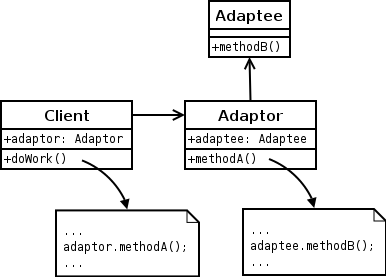
意图:将一个类的接口转成客户希望的另外一个接口。适配器模式使得原本不兼容而不能一起工作的那些类可以一起工作。
适配器:
- 你想使用一个已经存在的类,而它的接口不符合你的需求。
- 你想创建一个可以复用的类,该类可以与其他不相关的类或不可预见的类(即那些接口可能不一定兼容的类)协同工作。
- (仅适用于对象适配器)你想使用一些已经存在的子类,但是不可能对每一个都进行子类化以匹配它们的接口。对象适配器可以适配它的父类接口。
Object Adapter pattern
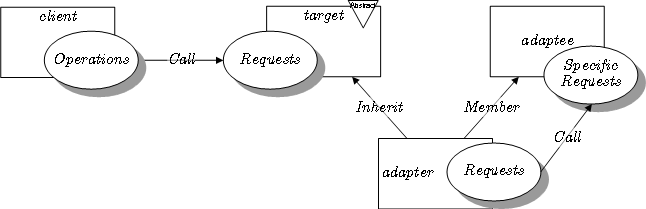
Class Adapter pattern
1
2
3
4
5
6
7
8
9
10
11
12
13
14
public class AdapteeToClientAdapter implements Adapter {

    private final Adaptee instance;

    public AdapteeToClientAdapter(final Adaptee instance) {
         this.instance = instance;
    }

    @Override
    public void clientMethod() {
       // call Adaptee's method(s) to implement Client's clientMethod
    }

}
桥接
意图:将抽象部分与它的实现部分分离,使它们都可以独立地变化。 适用性:
- 你不希望在抽象和它的实现部分之间有一个固定的绑定。例如这种情况可能是因为,在程序运行时刻实现部分应可以被选择或者切换。
- 类的抽象已经它的实现都应该可以通过生成子类的方式加以扩充。这时桥接模式使你可以对不同的抽象接口和实现部分进行组合,并分别对它们进行扩充。
- 对一个抽象的实现部分的修改应对客户不产生影响,即客户的代码不需要重新编译。


1
2
3
4
5
6
7
8
9
10
11
12
13
14
15
16
17
18
19
20
21
22
23
24
25
26
27
28
29
30
31
32
33
34
35
36
37
38
39
40
41
42
43
44
45
46
47
48
49
50
51
52
53
54
55
56
57
58
59
60
61
62
63
/** "Implementor" */
interface DrawingAPI {
    public void drawCircle(final double x, final double y, final double radius);
}

/** "ConcreteImplementor"  1/2 */
class DrawingAPI1 implements DrawingAPI {
    public void drawCircle(final double x, final double y, final double radius) {
        System.out.printf("API1.circle at %f:%f radius %f\n", x, y, radius);
    }
}

/** "ConcreteImplementor" 2/2 */
class DrawingAPI2 implements DrawingAPI {
    public void drawCircle(final double x, final double y, final double radius) {
        System.out.printf("API2.circle at %f:%f radius %f\n", x, y, radius);
    }
}

/** "Abstraction" */
abstract class Shape {
    protected DrawingAPI drawingAPI;

    protected Shape(final DrawingAPI drawingAPI){
        this.drawingAPI = drawingAPI;
    }

    public abstract void draw();                                 // low-level
    public abstract void resizeByPercentage(final double pct);   // high-level
}

/** "Refined Abstraction" */
class CircleShape extends Shape {
    private double x, y, radius;
    public CircleShape(final double x, final double y, final double radius, final DrawingAPI drawingAPI) {
        super(drawingAPI);
        this.x = x;  this.y = y;  this.radius = radius;
    }

    // low-level i.e. Implementation specific
    public void draw() {
        drawingAPI.drawCircle(x, y, radius);
    }
    // high-level i.e. Abstraction specific
    public void resizeByPercentage(final double pct) {
        radius *= (1.0 + pct/100.0);
    }
}

/** "Client" */
class BridgePattern {
    public static void main(final String[] args) {
        Shape[] shapes = new Shape[] {
            new CircleShape(1, 2, 3, new DrawingAPI1()),
            new CircleShape(5, 7, 11, new DrawingAPI2())
        };

        for (Shape shape : shapes) {
            shape.resizeByPercentage(2.5);
            shape.draw();
        }
    }
}
组合
意图:将对象组合成树形结构以表示“部分-整体”的层次结构。组合使得用户对单个对象和组合对象的使用具有一致性。
适用性:
- 你想表示对象的部分-整体层次结构。
- 你希望用户忽略组合对象与单个对象的不同,用户将统一地使用组合结构中的所有对象。


1
2
3
4
5
6
7
8
9
10
11
12
13
14
15
16
17
18
19
20
21
22
23
24
25
26
27
28
29
30
31
32
33
34
35
36
37
38
39
40
41
42
43
44
45
46
47
48
49
50
51
52
53
54
55
56
57
58
59
60
61
62
63
64
65
66
67
68
69
/** "Component" */
interface Graphic {

    //Prints the graphic.
    public void print();
}

/** "Composite" */
class CompositeGraphic implements Graphic {

    //Collection of child graphics.
    private List<Graphic> childGraphics = new ArrayList<Graphic>();

    //Prints the graphic.
    public void print() {
        for (Graphic graphic : childGraphics) {
            graphic.print();
        }
    }

    //Adds the graphic to the composition.
    public void add(Graphic graphic) {
        childGraphics.add(graphic);
    }

    //Removes the graphic from the composition.
    public void remove(Graphic graphic) {
        childGraphics.remove(graphic);
    }
}

/** "Leaf" */
class Ellipse implements Graphic {

    //Prints the graphic.
    public void print() {
        System.out.println("Ellipse");
    }
}

/** Client */
public class Program {

    public static void main(String[] args) {
        //Initialize four ellipses
        Ellipse ellipse1 = new Ellipse();
        Ellipse ellipse2 = new Ellipse();
        Ellipse ellipse3 = new Ellipse();
        Ellipse ellipse4 = new Ellipse();

        //Initialize three composite graphics
        CompositeGraphic graphic = new CompositeGraphic();
        CompositeGraphic graphic1 = new CompositeGraphic();
        CompositeGraphic graphic2 = new CompositeGraphic();

        //Composes the graphics
        graphic1.add(ellipse1);
        graphic1.add(ellipse2);
        graphic1.add(ellipse3);

        graphic2.add(ellipse4);

        graphic.add(graphic1);
        graphic.add(graphic2);

        //Prints the complete graphic (four times the string "Ellipse").
        graphic.print();
    }
}
装饰
意图:动态地给一个对象添加一些额外的职责。就增加功能来说,装饰模式相对于生成子类更为灵活。
适用性:
- 在不影响其他对象的情况下,以动态、透明的方式给单个对象添加职责。
- 处理那些可以撤销的职责。
- 当不能采用生成子类的方法进行扩充时。一种情况是,可以有大量独立的扩展,为支持每一个组合将产生大量的子类,使得子类数目呈现爆炸性增长。另一种情况可能是因为类定义被隐藏,或类定义不能用于生成子类。

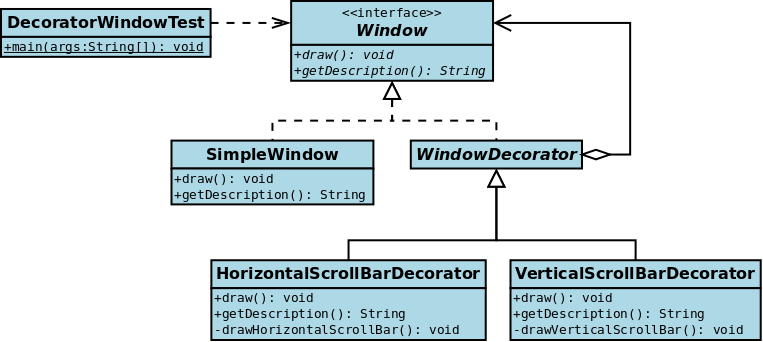
代码实例一
1
2
3
4
5
6
7
8
9
10
11
12
13
14
15
16
17
18
19
20
21
22
23
24
25
26
27
28
29
30
31
32
33
34
35
36
37
38
39
40
41
42
43
44
45
46
47
48
49
50
51
52
53
54
55
56
57
58
59
60
61
62
63
64
65
66
67
68
69
70
71
72
73
74
75
76
77
78
79
80
81
82
83
84
85
86
// The Window interface class
public interface Window {
    void draw(); // Draws the Window
    String getDescription(); // Returns a description of the Window
}

// Implementation of a simple Window without any scrollbars
class SimpleWindow implements Window {
    public void draw() {
        // Draw window
    }

    public String getDescription() {
        return "simple window";
    }
}

// abstract decorator class - note that it implements Window
abstract class WindowDecorator implements Window {
    protected Window windowToBeDecorated; // the Window being decorated

    public WindowDecorator (Window windowToBeDecorated) {
        this.windowToBeDecorated = windowToBeDecorated;
    }
    public void draw() {
        windowToBeDecorated.draw(); //Delegation
    }
    public String getDescription() {
        return windowToBeDecorated.getDescription(); //Delegation
    }
}

// The first concrete decorator which adds vertical scrollbar functionality
class VerticalScrollBarDecorator extends WindowDecorator {
    public VerticalScrollBarDecorator (Window windowToBeDecorated) {
        super(windowToBeDecorated);
    }

    @Override
    public void draw() {
        super.draw();
        drawVerticalScrollBar();
    }

    private void drawVerticalScrollBar() {
        // Draw the vertical scrollbar
    }

    @Override
    public String getDescription() {
        return super.getDescription() + ", including vertical scrollbars";
    }
}

// The second concrete decorator which adds horizontal scrollbar functionality
class HorizontalScrollBarDecorator extends WindowDecorator {
    public HorizontalScrollBarDecorator (Window windowToBeDecorated) {
        super(windowToBeDecorated);
    }

    @Override
    public void draw() {
        super.draw();
        drawHorizontalScrollBar();
    }

    private void drawHorizontalScrollBar() {
        // Draw the horizontal scrollbar
    }

    @Override
    public String getDescription() {
        return super.getDescription() + ", including horizontal scrollbars";
    }
}

public class DecoratedWindowTest {
    public static void main(String[] args) {
        // Create a decorated Window with horizontal and vertical scrollbars
        Window decoratedWindow = new HorizontalScrollBarDecorator (
                new VerticalScrollBarDecorator (new SimpleWindow()));

        // Print the Window's description
        System.out.println(decoratedWindow.getDescription());
    }
}
代码实例二
1
2
3
4
5
6
7
8
9
10
11
12
13
14
15
16
17
18
19
20
21
22
23
24
25
26
27
28
29
30
31
32
33
34
35
36
37
38
39
40
41
42
43
44
45
46
47
48
49
50
51
52
53
54
55
56
57
58
59
60
61
62
63
64
65
66
67
68
69
70
71
72
73
74
75
76
77
78
79
80
81
82
83
84
// The interface Coffee defines the functionality of Coffee implemented by decorator
public interface Coffee {
    public double getCost(); // Returns the cost of the coffee
    public String getIngredients(); // Returns the ingredients of the coffee
}

// Extension of a simple coffee without any extra ingredients
public class SimpleCoffee implements Coffee {
    @Override
    public double getCost() {
        return 1;
    }

    @Override
    public String getIngredients() {
        return "Coffee";
    }
}

// Abstract decorator class - note that it implements Coffee interface
public abstract class CoffeeDecorator implements Coffee {
    protected final Coffee decoratedCoffee;

    public CoffeeDecorator(Coffee c) {
        this.decoratedCoffee = c;
    }

    public double getCost() { // Implementing methods of the interface
        return decoratedCoffee.getCost();
    }

    public String getIngredients() {
        return decoratedCoffee.getIngredients();
    }
}

// Decorator WithMilk mixes milk into coffee.
// Note it extends CoffeeDecorator.
class WithMilk extends CoffeeDecorator {
    public WithMilk(Coffee c) {
        super(c);
    }

    public double getCost() { // Overriding methods defined in the abstract superclass
        return super.getCost() + 0.5;
    }

    public String getIngredients() {
        return super.getIngredients() + ", Milk";
    }
}

// Decorator WithSprinkles mixes sprinkles onto coffee.
// Note it extends CoffeeDecorator.
class WithSprinkles extends CoffeeDecorator {
    public WithSprinkles(Coffee c) {
        super(c);
    }

    public double getCost() {
        return super.getCost() + 0.2;
    }

    public String getIngredients() {
        return super.getIngredients() + ", Sprinkles";
    }
}

public class Main {
    public static void printInfo(Coffee c) {
        System.out.println("Cost: " + c.getCost() + "; Ingredients: " + c.getIngredients());
    }

    public static void main(String[] args) {
        Coffee c = new SimpleCoffee();
        printInfo(c);

        c = new WithMilk(c);
        printInfo(c);

        c = new WithSprinkles(c);
        printInfo(c);
    }
}
外观(facade)
意图:为子系统中的一组接口提供一个一致的界面,外观模式定义了一个高层接口,这个接口使得这一子系统更加容易使用。
适用性:
- 当你要为一个复杂子系统提供一个简单接口时。
- 客户程序与抽象类的实现部分之间存在着很大的依赖性。
- 当你需要构建一个层次结构的子系统时,使用外观模式定义子系统中每层的入口点。

1
2
3
4
5
6
7
8
9
10
11
12
13
14
15
16
17
18
19
20
21
22
23
24
25
26
27
28
29
30
31
32
33
34
35
36
37
38
39
40
41
42
43
44
45
/* Complex parts */

class CPU {
    public void freeze() { ... }
    public void jump(long position) { ... }
    public void execute() { ... }
}

class HardDrive {
    public byte[] read(long lba, int size) { ... }
}

class Memory {
    public void load(long position, byte[] data) { ... }
}

/* Facade */

class ComputerFacade {
    private CPU processor;
    private Memory ram;
    private HardDrive hd;

    public ComputerFacade() {
        this.processor = new CPU();
        this.ram = new Memory();
        this.hd = new HardDrive();
    }

    public void start() {
        processor.freeze();
        ram.load(BOOT_ADDRESS, hd.read(BOOT_SECTOR, SECTOR_SIZE));
        processor.jump(BOOT_ADDRESS);
        processor.execute();
    }
}

/* Client */

class You {
    public static void main(String[] args) {
        ComputerFacade computer = new ComputerFacade();
        computer.start();
    }
}
享元(flyweight)
意图:运用共享技术有效地支持大量细粒度的对象。
适用性:
- 一个应用程序使用了大量对象。
- 完全由于使用大量的对象,造成很大的存储开销。
- 对象的大多数状态都可改为外部状态。
- 如果删除对象的外部状态,那么可以用相对较少的共享对象取代很多组对象。
- 应用程序不依赖于对象标识。由于享元对象可以共享,对于概念上明显由别的对象,标识测试将返回真值。
1
2
3
4
5
6
7
8
9
10
11
12
13
14
15
16
17
18
19
20
21
22
23
24
25
26
27
28
29
30
31
32
33
34
35
36
37
38
39
40
41
42
43
44
45
46
47
48
49
50
51
52
53
54
55
56
57
58
59
60
61
62
63
64
65
66
67
68
69
70
71
72
73
74
75
76
77
78
79
80
81
82
83
84
// Instances of CoffeeFlavour will be the Flyweights
class CoffeeFlavour {
  private final String name;

  CoffeeFlavour(final String newFlavor) {
    this.name = newFlavor;
  }

  @Override
  public String toString() {
    return name;
  }
}

// Menu acts as a factory and cache for CoffeeFlavour flyweight objects
class Menu {
  private Map<String, CoffeeFlavour> flavours = new ConcurrentHashMap<String, CoffeeFlavour>();

  synchronized CoffeeFlavour lookup(final String flavorName) {
    if (!flavours.containsKey(flavorName))
      flavours.put(flavorName, new CoffeeFlavour(flavorName));
    return flavours.get(flavorName);
  }

  synchronized int totalCoffeeFlavoursMade() {
    return flavours.size();
  }
}

// Order is the context of the CoffeeFlavour flyweight.
class Order {
  private final int tableNumber;
  private final CoffeeFlavour flavour;

  Order(final int tableNumber, final CoffeeFlavour flavor) {
    this.tableNumber = tableNumber;
    this.flavour = flavor;
  }

  void serve() {
    System.out.println("Serving " + flavour + " to table " + tableNumber);
  }
}

public class CoffeeShop {
  private final List<Order> orders = new Vector<Order>();
  private final Menu menu = new Menu();

  void takeOrder(final String flavourName, final int table) {
    CoffeeFlavour flavour = menu.lookup(flavourName);
    Order order = new Order(table, flavour);
    orders.add(order);
  }

  void service() {
    for (Order order : orders)
      order.serve();
  }

  String report() {
    return "\ntotal CoffeeFlavour objects made: "
        + menu.totalCoffeeFlavoursMade();
  }

  public static void main(final String[] args) {
    CoffeeShop shop = new CoffeeShop();

    shop.takeOrder("Cappuccino", 2);
    shop.takeOrder("Frappe", 1);
    shop.takeOrder("Espresso", 1);
    shop.takeOrder("Frappe", 897);
    shop.takeOrder("Cappuccino", 97);
    shop.takeOrder("Frappe", 3);
    shop.takeOrder("Espresso", 3);
    shop.takeOrder("Cappuccino", 3);
    shop.takeOrder("Espresso", 96);
    shop.takeOrder("Frappe", 552);
    shop.takeOrder("Cappuccino", 121);
    shop.takeOrder("Espresso", 121);

    shop.service();
    System.out.println(shop.report());
  }
}
代理(proxy)
意图:为其他对象提供一种代理以控制对这个对象的访问。
1
2
3
4
5
6
7
8
9
10
11
12
13
14
15
16
17
18
19
20
21
22
23
24
25
26
27
28
29
30
31
32
33
34
35
36
37
38
39
40
41
42
43
44
45
46
47
48
49
50
51
52
53
54
55
56
57
58
59
60
61
62
63
64
65
66
67
68
69
70
71
72
73
74
interface Image {
    public void displayImage();
}

// On System A
class RealImage implements Image {

    private String filename = null;
    /**
     * Constructor
     * @param filename
     */
    public RealImage(final String filename) {
        this.filename = filename;
        loadImageFromDisk();
    }

    /**
     * Loads the image from the disk
     */
    private void loadImageFromDisk() {
        System.out.println("Loading   " + filename);
    }

    /**
     * Displays the image
     */
    public void displayImage() {
        System.out.println("Displaying " + filename);
    }

}

// On System B
class ProxyImage implements Image {

    private RealImage image = null;
    private String filename = null;
    /**
     * Constructor
     * @param filename
     */
    public ProxyImage(final String filename) {
        this.filename = filename;
    }

    /**
     * Displays the image
     */
    public void displayImage() {
        if (image == null) {
           image = new RealImage(filename);
        }
        image.displayImage();
    }

}

class ProxyExample {

   /**
    * Test method
    */
   public static void main(final String[] arguments) {
        final Image image1 = new ProxyImage("HiRes_10MB_Photo1");
        final Image image2 = new ProxyImage("HiRes_10MB_Photo2");

        image1.displayImage(); // loading necessary
        image1.displayImage(); // loading unnecessary
        image2.displayImage(); // loading necessary
        image2.displayImage(); // loading unnecessary
        image1.displayImage(); // loading unnecessary
    }
}